Your Scrap Basket: counted scraps and bonus HSTs
Record your scraps by how many, what shape and what size. Check them against a quilt, and use your leftover triangles for bonus HSTs.
StitchBlock My Stash and the Scrap Basket: Stash-Aware quilt design with the fabric you own Watch on YouTube, bigger and with chapters
The Scrap Basket is for scraps you have already cut to one size: 2½″ squares, 3″ squares, the triangles left over from stitch-and-flip corners. Tell the app how many, what shape and what size, and it can check them against a quilt. It is a tab of My Stash, on your phone and in the Studio.
A piece that isn’t a full width off the bolt, like a leftover, goes here too, as a rectangle or a strip with its size. Yardage in My Stash is always figured across the full width of its bolt.
One thing up front: the app can only check what you count. It can’t measure your basket for you. Every pile needs a count and a size. Keep more than one size or shape? Give each its own pile: 120 × 2½″ squares in one, 40 × 3″ × 6″ rectangles in another, triangles in a third.
Add your scraps
On your phone: tap the camera and put one scrap on the mat. When the camera asks what it is, answer Scraps: shape, size and how many. Or open a fabric in My Stash that has yardage recorded and tick “I also have scraps of this”. Untick it to remove them.
In the Studio: on the Scrap Basket tab, tap + Add scraps. A new pile opens, ready for its count, shape and size. You can also turn on Scraps in + Add fabric & precuts, which takes a name and a photo with each pile.
Leave the count blank on a photographed scrap and it is still saved, but as a picture of your scraps, not numbers. The app never checks it against a quilt, and a reminder to count it waits on your stash to-do list.
Scraps need no name. A color is enough. A fabric that is only scraps sits on the Scrap Basket tab and is counted there, not on the Fabric Stash tab.
The shapes
Squares take one measurement and rectangles take two. Strips are width, then length: the leftovers of strip piecing. Triangles are right triangles, measured on the two short sides, which is the shape a stitch-and-flip leftover is.
Hexagons, 60° triangles and 60° diamonds are the English paper piecing shapes. Each is named by one side, the way a 1″ hexie is. The basket keeps, counts and pictures them, but the app does not check them against a quilt’s cutting.
Sort and find your scraps
On your phone the basket is a list. Organize by has five choices: Shape, Size, “Shape, then size”, Color and Project. Each line has its own Remove.
In the Studio the basket is cards. A pile you photographed shows its swatch. Organize by has Shape, Size, Color and Project. A Shape card has a chip for each size, and the other cards have a chip for each shape. The pencil opens the card’s piles, where you change a count, a shape or a size. The red × removes the picked chip’s piles.
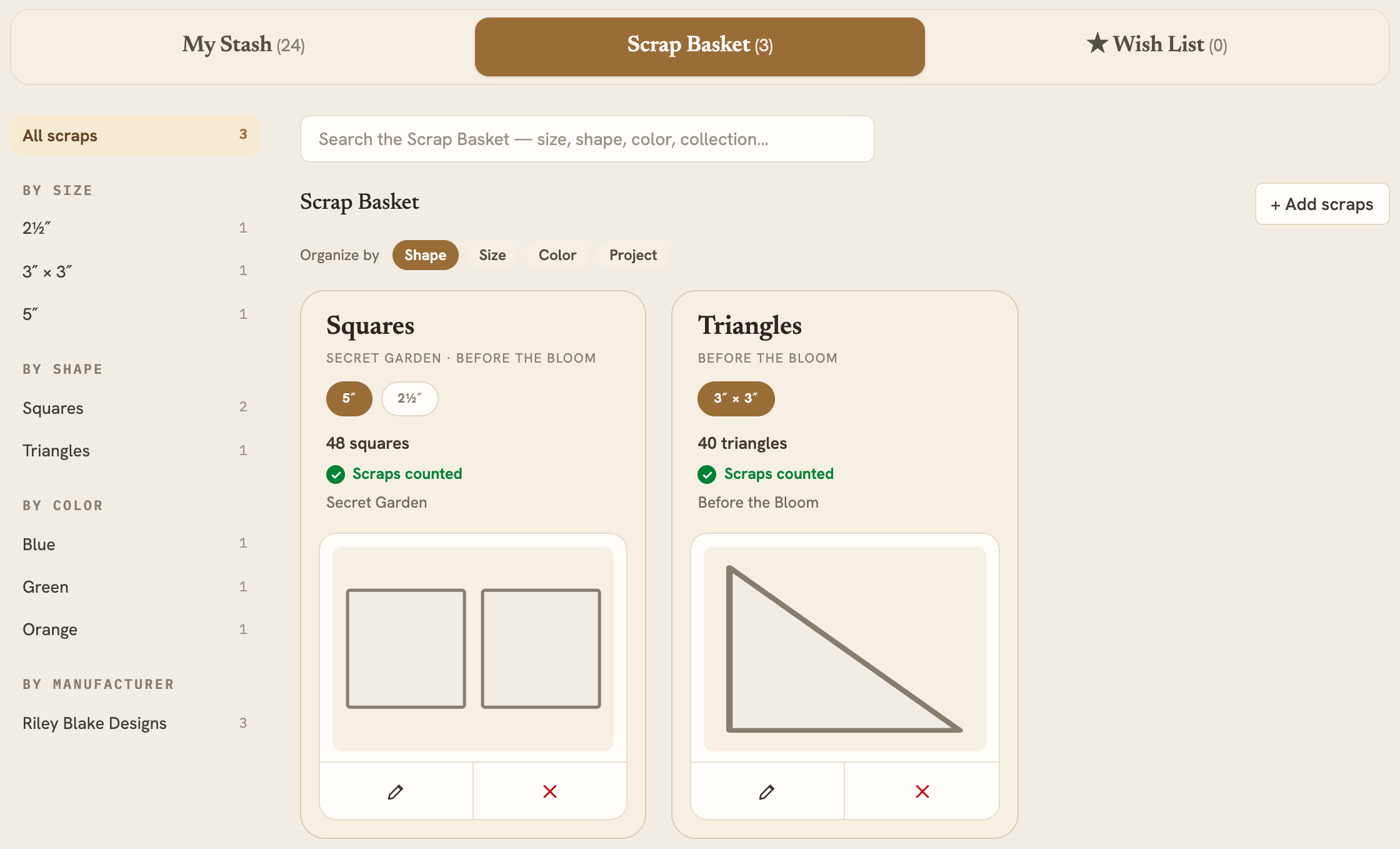
The Studio’s rail on the left lists By size, By shape, By color, By project and By manufacturer. The search box, on your phone too, takes a size typed as 2½, 2.5 or 2 1/2.
Scraps from cutting day
Check off a quilt’s last cut and settle the stash update. The congratulations card then asks: “Keep any scraps?”
Tap the fabrics you have scraps from. They are the quilt’s own swatches.
Count and size each one now, or leave a row blank and count it later from your to-do list.
Each pile is tied to its fabric and goes in your Scrap Basket under the quilt’s name. Organize the basket by Project and each quilt has its own group. The app never guesses what cutting day left over. Only you can count the pieces.
Check your scraps against a quilt
Open the quilt. In the Inspector, tap the SmartBlock tab and find the Scrap Basket section, under Fabric-Fit.
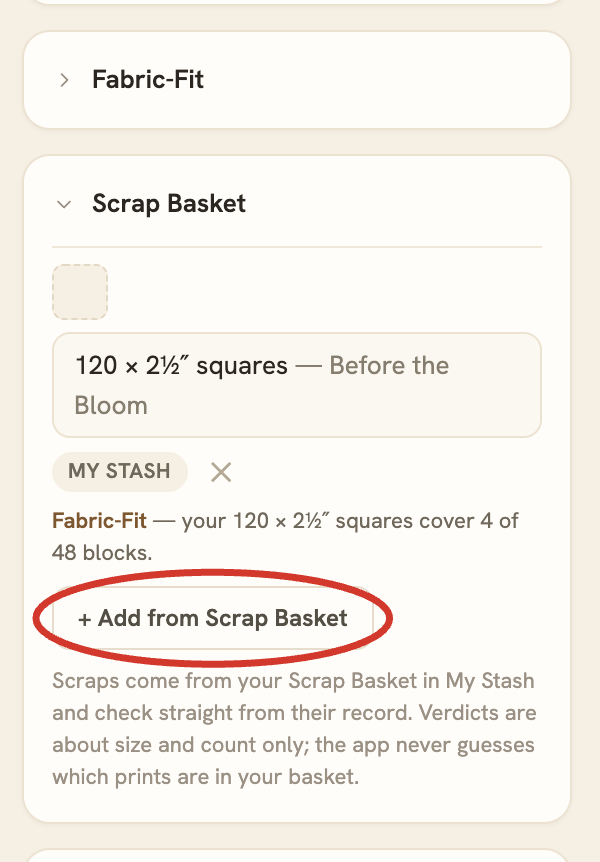
Tap + Add from Scrap Basket. It lists your counted piles. Tap one.
The pile goes on the card with a sentence about this quilt. The card reads the count and size from My Stash, so a recount there changes the sentence here. You can’t type scraps onto this card. A pile marked Typed in was typed onto the card, and it stays until you remove it.
What the card says
Each pile is checked on its own against this quilt’s cut list: could these scraps cover this quilt? The card may say “your 100 × 3″ squares cover all 180 block pieces”, with how many are spare. It may say they “cover 10 of 20 blocks”. Or it lists the block sizes your scraps cover fully, and a tap on one sets the block size.
Triangle scraps count toward the squares and rectangles that fit inside them. A 6″ triangle gives about a 3″ square, which surprises most people the first time.
The app knows how many pieces you have and how big they are. It never knows which prints are in your basket. So it never paints scraps onto the quilt for you, and no pattern page names a print from your basket.
A pile can name the collection it came from: in the Studio, tap the pencil on the pile’s row. That is handy for pulling that collection’s swatches to paint a matching pillow, but it is a note for you. The check does not use it.
Leftover flying geese units
Sewn units that never went into a quilt, such as a pile of flying geese from a project that changed direction, are not cloth. Nothing can be cut from them. Record them as flying geese units: how many, and the size of each as it measures now, short side then long side (5″ × 9½″, say).
The card tells you what they finish at and whether the open quilt uses a goose that size. It lists which library blocks do, and at what block size: a 4½″ × 9″ goose is half the block in a Sawtooth Star, so an 18″ block. It also says how many blocks your pile makes and how much flying geese border it would make.
A unit that measures a little long trims to a true goose. One that is far from twice as long as it is tall is not a goose, and the card says so. This is a note for you: the pattern’s cutting stays standard.
Bonus HSTs from your triangles
A half-square triangle, HST for short, is the everyday quilt unit made of two triangles sewn into a square. Right-triangle scraps with two equal short sides, the leftovers stitch-and-flip corners make, can become them.
The card says how far yours go. “your 40 triangles pair into 20 bonus HSTs (sew pairs along the long edge, trim to size): enough to cover all 16 of this quilt’s HSTs”. A pair trims to an HST that finishes at the triangle’s short side less ⅞″.
When your triangles cover a whole group of this quilt’s HSTs, the card offers “Use my triangles for these HSTs”. Nothing changes until you tap it.
Tap it and the whole pattern changes together. Those HST squares leave the cutting lists, and the supplies stop asking you to buy fabric for them. A step labeled “From your Scrap Basket” takes their place, with the size to trim each pair to. Everything else cuts as written, and the standard technique pages stay standard.
It is all or nothing for each size. If your basket count drops below what a group needs, or the quilt changes, every page goes back to standard cutting together, and the card says so. Back to standard cutting, or Undo, takes it out any time.